ROW_NUMBER / RANK / DENSE_RANK
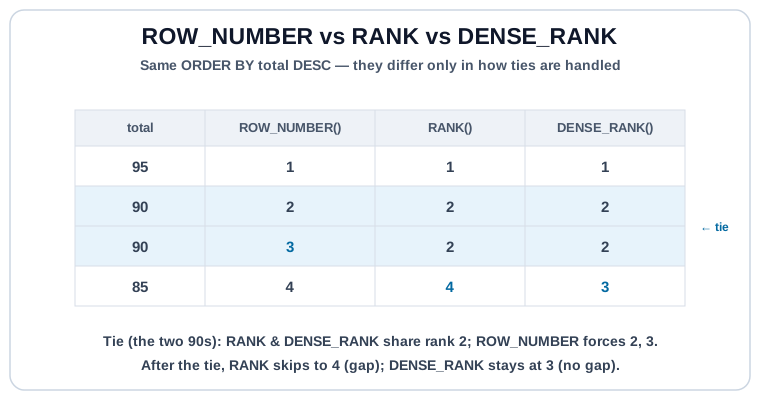
Three ranking functions, one job: number rows inside a window in order. They differ only in how they handle ties.
| Function | Ties | Gaps after a tie |
|---|---|---|
ROW_NUMBER() | Broken arbitrarily into a unique sequence | No |
RANK() | Ties share a rank | Yes (1, 1, 3, 4…) |
DENSE_RANK() | Ties share a rank | No (1, 1, 2, 3…) |
All three take no arguments and require an ORDER BY inside OVER (...).
Syntax #
SELECT
  user_id,
  id AS order_id,
  total,
  ROW_NUMBER() OVER (PARTITION BY user_id ORDER BY total DESC, id) AS rn,
  RANK()       OVER (PARTITION BY user_id ORDER BY total DESC)     AS rk,
  DENSE_RANK() OVER (PARTITION BY user_id ORDER BY total DESC)     AS dr
FROM orders;
Which One to Use #
ROW_NUMBER(): you want exactly N rows. Top-3, latest record per group, dedupe-and-keep-one. If you don't care how ties are broken, add a tie-breaker column toORDER BYso the output is deterministic.RANK()— leaderboard semantics. "Tied for 2nd" matters, and the next person really is in 4th place.DENSE_RANK(): grouping by rank without gaps. Useful when you want N distinct levels (top-3 distinct totals, even if more than three rows share those totals).
Top-N Per Group #
The canonical use case. Rank within each group, then filter. Filtering on a window function requires a CTE or subquery (or QUALIFY on engines that have it).
-- Each user's top 2 paid orders by total
WITH ranked AS (
  SELECT
    id AS order_id,
    user_id,
    total,
    ROW_NUMBER() OVER (
      PARTITION BY user_id
      ORDER BY total DESC, id
    ) AS rn
  FROM orders
  WHERE status = 'paid'
)
SELECT order_id, user_id, total, rn
FROM ranked
WHERE rn <= 2
ORDER BY user_id, rn;Incomplete ORDER BY makes ROW_NUMBER() non-deterministic.
If two rows share every column in ORDER BY, the engine is free to put either one first, and that decision can change between runs, engines, and even query plans. Always add a stable tie-breaker (typically the primary key) to ORDER BY inside the window: ORDER BY total DESC, id. Tests and business logic that depend on "which row wins a tie" should be pinned this way.
Dedupe a Table #
Another signature use: keep one row per key, the "best" by some definition (latest, highest, first):
-- Keep the most recent order per user
WITH ranked AS (
  SELECT
    *,
    ROW_NUMBER() OVER (
      PARTITION BY user_id
      ORDER BY created_at DESC, id DESC
    ) AS rn
  FROM orders
)
SELECT id, user_id, total, created_at
FROM ranked
WHERE rn = 1;
Try It #
Rank each user's orders by total (highest first) using all three functions side by side. Tie behavior is the whole point; watch the columns diverge on users with equal totals.
Practice #
Return each user's highest-total paid order. Output: order_id, user_id, total. Tie-break by lowest order_id first. Use ROW_NUMBER(). No ordering requirement on the final result.
Mistakes to Watch For #
WHERE rn <= Nin the sameSELECTwherernwas computed — window functions run afterWHERE. Use a CTE / subquery, orQUALIFYwhere supported.- Missing tie-breaker in
ORDER BY: tied rows rank non-deterministically and results change between runs. - Using
RANKwhen you meantDENSE_RANK(or vice versa). Check whether gaps matter for your output. - Forgetting
PARTITION BYand getting a global rank instead of per-group. The function still runs, just over the whole table.
Knowledge check #
4 questions
For scores
(95, 90, 90, 85),ROW_NUMBERreturns:For scores
(95, 90, 90, 85),RANKreturns:For "top 3 most-recent orders per user," the canonical pattern is:
Without
PARTITION BY,ROW_NUMBER() OVER (ORDER BY total DESC)produces:
Next Step #
Continue to LAG / LEAD: peek at the previous or next row in a window to compute period-over-period changes.