Cohorts & Retention
A cohort is a group of users who share a starting event, such as "everyone who signed up in March 2024". Retention asks: of that group, how many came back in the months after?
Growth dashboards show signup volume. Retention shows whether the product is any good. Separating the two is the core job of cohort analysis.
The Four-Step Pattern #
Every retention query follows the same structure:
- Cohort: assign each user a cohort label (usually their signup month).
- Activity: bucket each user's activity into periods (monthly, weekly).
- Retained: join cohort to activity, count distinct active users per
(cohort, period). - Normalize: divide by cohort size to get retention percentage.
Most beginner retention queries skip step 4 and show raw counts, which are useless for comparison, since a 100-user cohort retaining 50 people is very different from a 10-user cohort retaining 5.
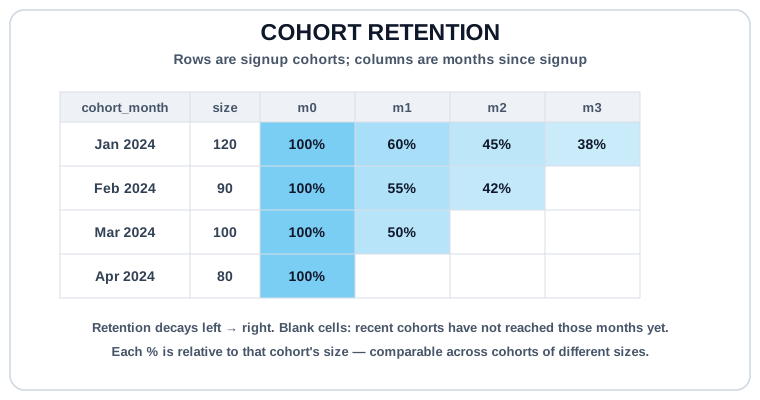
Long Format (Row Per Cell) #
-- Monthly retention: users active N months after signup
WITH cohort AS (
  SELECT
    id AS user_id,
    DATE_TRUNC('month', created_at) AS cohort_month
  FROM users
),
activity AS (
  SELECT DISTINCT
    user_id,
    DATE_TRUNC('month', order_date) AS activity_month
  FROM orders
  WHERE status = 'paid'
),
cohort_size AS (
  SELECT cohort_month, COUNT(*) AS cohort_users
  FROM cohort
  GROUP BY cohort_month
),
retained AS (
  SELECT
    c.cohort_month,
    DATE_DIFF('month', c.cohort_month, a.activity_month) AS month_number,
    COUNT(DISTINCT a.user_id) AS retained_users
  FROM cohort AS c
  INNER JOIN activity AS a ON a.user_id = c.user_id
  WHERE a.activity_month >= c.cohort_month
  GROUP BY c.cohort_month, month_number
)
SELECT
  r.cohort_month,
  r.month_number,
  cs.cohort_users,
  r.retained_users,
  ROUND(100.0 * r.retained_users / cs.cohort_users, 1) AS retention_pct
FROM retained AS r
INNER JOIN cohort_size AS cs ON cs.cohort_month = r.cohort_month
ORDER BY r.cohort_month, r.month_number;
This is the "long" (tall) format: one row per (cohort, month_number) cell. Good for SQL-to-SQL pipelines; bad for humans to read at scale.
Cohort Table (Pivoted Output) #
What dashboards actually render is a cohort table: one row per cohort, columns for month 0, 1, 2, etc. Pivot with conditional aggregation:
-- Pivoted cohort table: one row per cohort, months as columns
WITH cohort AS (
  SELECT id AS user_id, DATE_TRUNC('month', created_at) AS cohort_month FROM users
),
activity AS (
  SELECT DISTINCT user_id, DATE_TRUNC('month', order_date) AS activity_month
  FROM orders WHERE status = 'paid'
),
retained AS (
  SELECT
    c.cohort_month,
    c.user_id,
    DATE_DIFF('month', c.cohort_month, a.activity_month) AS month_number
  FROM cohort AS c
  INNER JOIN activity AS a ON a.user_id = c.user_id
  WHERE a.activity_month >= c.cohort_month
)
SELECT
  cohort_month,
  COUNT(DISTINCT user_id) FILTER (WHERE month_number = 0) AS m0,
  COUNT(DISTINCT user_id) FILTER (WHERE month_number = 1) AS m1,
  COUNT(DISTINCT user_id) FILTER (WHERE month_number = 2) AS m2,
  COUNT(DISTINCT user_id) FILTER (WHERE month_number = 3) AS m3
FROM retained
GROUP BY cohort_month
ORDER BY cohort_month;
COUNT(DISTINCT user_id) FILTER (WHERE month_number = N) counts only the rows matching that filter. It is the modern idiom for pivoting without a full PIVOT clause. Works in DuckDB, Postgres, and most analytics engines.
"Active" is a product decision, not a SQL one.
Does "active in month N" mean one login? One purchase? A minimum spend? Two distinct sessions? Retention numbers change dramatically with the definition. Pick one, document it, and keep it stable across reports. Changing the activity definition to make retention look better is a classic metric-tampering pattern — downstream consumers will lose trust in your numbers.
Retention vs Reactivation #
Two related but different metrics:
- Retention counts users active in every period from cohort through month N (or at least continuously). Strict.
- Reactivation counts users active in month N regardless of what they did in-between. Loose.
The long-format query above is reactivation-style: users can skip months and still show up. If you need strict continuous retention, add a check that they were also active in month N-1, or use windowed logic to compute streaks.
Try It #
Monthly retention across signup cohorts using the seeded users (signup dates) and orders (activity). The long format is what you'd pipe to BI; the pivoted version is what the dashboard shows.
Practice #
Build a long-format monthly retention table from seeded users and paid orders. Output columns: cohort_month, month_number, cohort_users, retained_users, retention_pct (rounded to 1 decimal). Only include (cohort_month, month_number) cells where users actually retained. No ordering requirement.
Mistakes to Watch For #
- Reporting raw retained-user counts without dividing by cohort size. A big cohort will always "retain" more users than a small one; percentages are what compare.
- Letting "active" drift between reports: one analyst counts logins, another counts purchases, numbers stop matching, trust erodes. Pin the definition.
- Forgetting
DISTINCTon activity users. A user with 10 orders in month 2 shouldn't count 10 times toward retention. - Including pre-cohort activity (
activity_month < cohort_month). That's a bug, not a signal; theWHERE activity_month >= cohort_monthfilter is mandatory. - Mixing retention and reactivation without labeling which is which. They answer different questions and should be named differently in the output.
Knowledge check #
4 questions
A cohort is:
For "% of January cohort still active in March," the right structure is:
A common mistake when comparing recent and old cohorts:
Active in week 0 (signup week) is typically:
Next Step #
Continue to Funnels, ordered-step conversion analysis and the sibling pattern for measuring product flow.