Moving Averages & Running Totals
A running total is a windowed SUM that accumulates from the start of a series to the current row. A moving average is a windowed AVG over the last N rows. Both use a windowed aggregate plus a frame clause: the ROWS BETWEEN ... AND ... bit that says which neighbors count.
SUM(x) OVER (ORDER BY d ROWS BETWEEN UNBOUNDED PRECEDING AND CURRENT ROW)
AVG(x) OVER (ORDER BY d ROWS BETWEEN 6 PRECEDING AND CURRENT ROW)
Without a frame, the SQL-standard default (with ORDER BY) is RANGE BETWEEN UNBOUNDED PRECEDING AND CURRENT ROW, which silently includes every row tied with the current row's ORDER BY value. Always write the frame explicitly.
The Frame Clause #
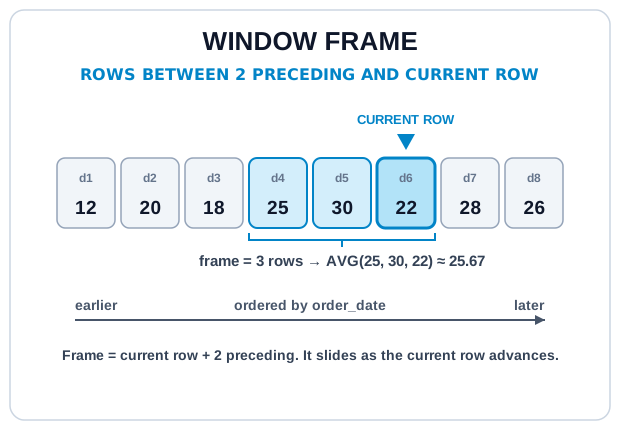
A frame selects a subset of rows within the partition, relative to the current row. Three pieces:
| Bound | Meaning |
|---|---|
UNBOUNDED PRECEDING | Start of the partition |
N PRECEDING | N rows before the current row |
CURRENT ROW | The current row itself |
N FOLLOWING | N rows after |
UNBOUNDED FOLLOWING | End of the partition |
The two most common shapes:
- Running total:
ROWS BETWEEN UNBOUNDED PRECEDING AND CURRENT ROW - Moving average (last N):
ROWS BETWEEN (N-1) PRECEDING AND CURRENT ROW
Running Total #
-- Cumulative paid revenue, day by day
WITH daily AS (
  SELECT
    order_date,
    ROUND(SUM(total), 2) AS daily_revenue
  FROM orders
  WHERE status = 'paid'
  GROUP BY order_date
)
SELECT
  order_date,
  daily_revenue,
  ROUND(
    SUM(daily_revenue) OVER (
      ORDER BY order_date
      ROWS BETWEEN UNBOUNDED PRECEDING AND CURRENT ROW
    ),
    2
  ) AS running_revenue
FROM daily
ORDER BY order_date;
Each day's running_revenue is the sum of that day plus every previous day. The ORDER BY order_date inside OVER is what establishes "previous."
Moving Average #
-- 7-day rolling average of daily paid revenue
WITH daily AS (
  SELECT
    order_date,
    ROUND(SUM(total), 2) AS daily_revenue
  FROM orders
  WHERE status = 'paid'
  GROUP BY order_date
)
SELECT
  order_date,
  daily_revenue,
  ROUND(
    AVG(daily_revenue) OVER (
      ORDER BY order_date
      ROWS BETWEEN 6 PRECEDING AND CURRENT ROW
    ),
    2
  ) AS avg_7d
FROM daily
ORDER BY order_date;
Days 1–6 average over fewer than 7 rows (the frame just uses whatever's available). That's usually fine. But if a clean "first full 7-day point starts at day 7" matters, filter the output with WHERE order_date >= (min + 6 days).
ROWS counts physical rows; RANGE groups rows by value.ROWS BETWEEN 6 PRECEDING AND CURRENT ROW always takes the 7 nearest rows by position. RANGE BETWEEN 6 PRECEDING AND CURRENT ROW (on a numeric or date key) takes every row whose key is within 6 units of the current row, a subtle but important difference when your series has duplicates or gaps.RANGE with tied ORDER BY values includes all tied rows in the frame, which can produce surprising aggregates. Use ROWS unless you specifically want value-based semantics.
Per-Group Running Totals #
Add PARTITION BY to reset the accumulation per group: cumulative revenue per user, lifetime order count per customer, etc.
-- Each paid order's cumulative spend for that user, over time
SELECT
  user_id,
  id AS order_id,
  order_date,
  total,
  ROUND(
    SUM(total) OVER (
      PARTITION BY user_id
      ORDER BY order_date, id
      ROWS BETWEEN UNBOUNDED PRECEDING AND CURRENT ROW
    ),
    2
  ) AS lifetime_spend
FROM orders
WHERE status = 'paid'
ORDER BY user_id, order_date, id;
Try It #
Daily paid revenue plus its running total and 3-day moving average. Try the frame swaps in the hints to feel the difference between ROWS and RANGE.
Practice #
For each user, return every paid order with its user_id, order_id, order_date, total, and lifetime_spend: the running sum of that user's paid-order totals ordered by order_date then id, rounded to 2. No ordering requirement on the final result.
Mistakes to Watch For #
- Omitting the frame clause and getting the default
RANGEframe's tie-inclusion behavior. Always writeROWS BETWEEN ... AND ...explicitly for cumulative or rolling metrics. - Confusing
ROWSwithRANGE:RANGEpulls in tied rows, which breaks counts and averages in subtle ways. - Missing dates in the source. A "7 PRECEDING" frame over sparse data gives a 7-row average, not a 7-day average. Densify against a date spine if calendar-accurate smoothing matters.
- Forgetting
PARTITION BYand accidentally accumulating across groups, so per-user running totals become one global running total.
Knowledge check #
4 questions
For per-user running totals (resets when the user changes), add:
A rolling 7-day average (the previous 6 days plus the current row) is:
A frame
RANGE BETWEEN UNBOUNDED PRECEDING AND CURRENT ROWincludes:A common mistake when computing a rolling 30-day metric on irregular daily data:
Next Step #
Continue to QUALIFY: filter on window-function results directly, without wrapping the query in a CTE.