OVER / PARTITION BY / ORDER BY
A window function computes a value across a set of related rows, without collapsing them the way GROUP BY does. Every input row stays in the output; you just get one extra column computed over its "window" of neighbors.
aggregate_or_rank() OVER (PARTITION BY ... ORDER BY ...)That OVER (...) clause is what makes a function a window function. Drop it and you're back to a regular aggregate or scalar.
The Three Moving Parts #
Every window function answers three questions:
| Clause | Question it answers |
|---|---|
OVER () | What function is windowed? (e.g. AVG, ROW_NUMBER, SUM) |
PARTITION BY | Which rows share a window? (the group, reset per value) |
ORDER BY | In what order are rows inside the window processed? (matters for ranking, running totals) |
Omit PARTITION BY and the window is the whole result set. Omit ORDER BY and sequence-dependent functions become undefined.
Window vs GROUP BY #
They look similar but produce different output shapes:
-- GROUP BY: one row per user
SELECT user_id, AVG(total) AS user_avg
FROM orders
GROUP BY user_id;

-- Window: every order row, with its user's average alongside
SELECT
  id,
  user_id,
  total,
  AVG(total) OVER (PARTITION BY user_id) AS user_avg
FROM orders;
The window version is what you want when you need to compare each row to its group: "this order vs this user's average" in a single pass.
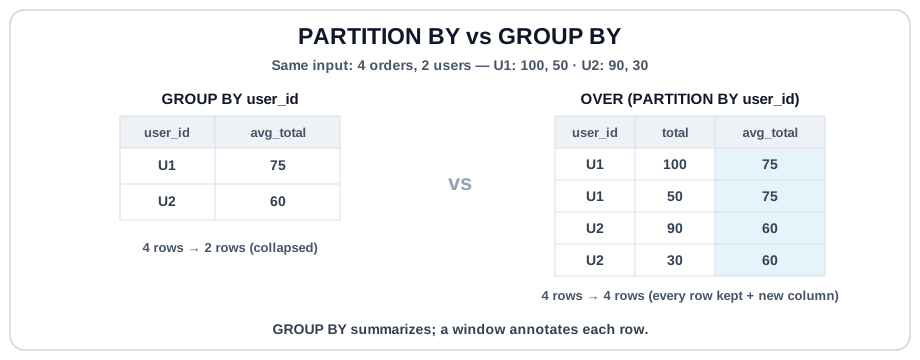
PARTITION BY #
PARTITION BY is the window-function equivalent of GROUP BY. The function restarts its calculation whenever the partition key changes: per-user averages, per-category ranks, per-day running totals.
-- Each order's total alongside the user's average order total
SELECT
  id AS order_id,
  user_id,
  total,
  ROUND(AVG(total) OVER (PARTITION BY user_id), 2) AS user_avg_total
FROM orders
ORDER BY user_id, id;
ORDER BY Inside the Window #
Two different ORDER BY clauses can appear in a windowed query, and they mean different things:
ORDER BYinsideOVER (...)controls sequence within the window, and is required for ranking and running totals.ORDER BYat the end of the query controls the final output order.
They are independent. Don't conflate them.
SELECT
  id AS order_id,
  user_id,
  total,
  ROW_NUMBER() OVER (PARTITION BY user_id ORDER BY total DESC) AS rn
--                                         ^^^^^^^^^^^^^^^^^ window order
FROM orders
ORDER BY user_id, rn;
--^^^^^^^^^^^^^^^^^^^ output orderYou cannot filter on a window function in the same SELECT's WHERE.
-- ❌ Errors — window functions aren't evaluated yet at WHERE time
SELECT id, ROW_NUMBER() OVER (...) AS rn
FROM orders
WHERE rn = 1;
Window functions run after WHERE / GROUP BY / HAVING. To filter on a window result, wrap the query in a CTE or subquery and filter in the outer WHERE. DuckDB and Snowflake also support the QUALIFY clause as a shortcut, but it's not universal.
Try It #
Compare each order's total to its user's average order total. Notice the detail rows stay intact; you never GROUP BY.
Practice #
For every order, return order_id, user_id, total, and user_avg_total: the average total of all that user's orders, rounded to 2. No filtering, no GROUP BY. Use a window function. No ordering requirement.
Mistakes to Watch For #
- Filtering on a window result in the same
WHERE. Use a CTE / subquery (orQUALIFYon engines that support it). - Forgetting
PARTITION BYwhen you wanted per-group behavior. The window silently spans the entire result set. - Confusing the two
ORDER BYclauses: the one insideOVERcontrols window sequence, the outer one controls final row order. - Using a window function when
GROUP BYwould answer the question. Windowed queries keep every detail row, which is often more data than you need.
Knowledge check #
3 questions
SUM(amount) OVER (ORDER BY day)produces what value on each row?In
SUM(amount) OVER (PARTITION BY user_id ORDER BY day), when does the running total reset?SUM(amount) OVER ()with empty parentheses. What does it return?
Next Step #
Continue to ROW_NUMBER / RANK / DENSE_RANK, the ranking functions that make top-N-per-group queries trivial.