LAG / LEAD
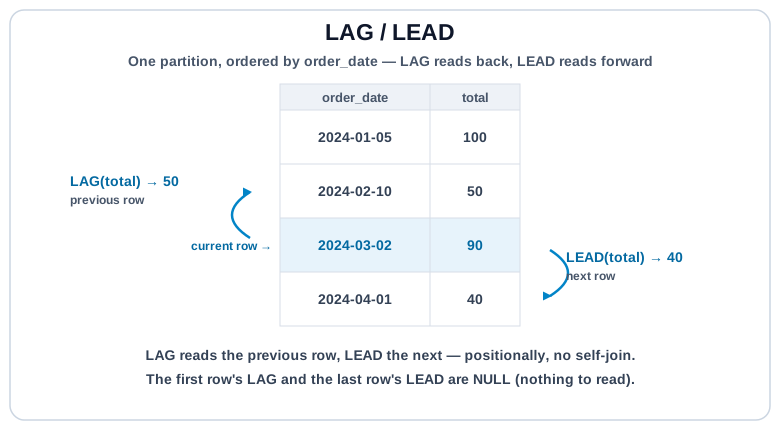
LAG pulls the previous row's value into the current row. LEAD pulls the next row's value. Together they turn per-row comparisons ("change vs last month", "time until next order") into a single query, no self-join needed.
LAG(expr, offset, default)  OVER (PARTITION BY ... ORDER BY ...)
LEAD(expr, offset, default) OVER (PARTITION BY ... ORDER BY ...)
The second and third arguments are optional: offset defaults to 1, default to NULL.
Syntax #
SELECT
  user_id,
  order_date,
  total,
  LAG(total)  OVER (PARTITION BY user_id ORDER BY order_date) AS prev_total,
  LEAD(total) OVER (PARTITION BY user_id ORDER BY order_date) AS next_total
FROM orders;
Inside each user's partition, ordered by order_date:
- The first row has no previous, so
prev_totalisNULL. - The last row has no next, so
next_totalisNULL. - Everything in the middle gets both.
Period-over-Period Change #
The most common use: "how much did this change vs the previous period?" Classic revenue-growth, month-over-month, and churn-signal queries.
-- Each paid order's delta vs the user's previous paid order
SELECT
  user_id,
  order_date,
  total,
  LAG(total) OVER (PARTITION BY user_id ORDER BY order_date, id) AS prev_total,
  ROUND(
    total - LAG(total) OVER (PARTITION BY user_id ORDER BY order_date, id),
    2
  ) AS delta_vs_prev
FROM orders
WHERE status = 'paid'
ORDER BY user_id, order_date, id;
The first order per user has NULL for prev_total and delta_vs_prev, since there's nothing to compare against. That's usually correct behavior, but see the pitfall below.
Default Value #
LAG(col, 1, 0) returns 0 instead of NULL when there's no previous row. Useful when you want to treat "no prior value" as a zero baseline, e.g. first order's delta should equal the order total itself.
-- First order per user counts as a +total delta
SELECT
  user_id,
  order_date,
  total,
  ROUND(
    total - LAG(total, 1, 0) OVER (PARTITION BY user_id ORDER BY order_date, id),
    2
  ) AS delta_vs_prev
FROM orders
WHERE status = 'paid'
ORDER BY user_id, order_date, id;LAG / LEAD are positional, not temporal.
They step to the previous row in the window, regardless of the time gap. If a user skipped March and their next order is in May, LAG(total) ORDER BY order_date compares May to February, not to a nonexistent March. For strict time-based offsets (e.g. "same month last year"), either densify the series first with CROSS JOIN against a date spine, or use a self-join on the exact lag key.
Time Between Events #
LEAD over a timestamp gives you the next event; subtract to get the gap.
-- Days until each user's next paid order
SELECT
  user_id,
  order_date,
  LEAD(order_date) OVER (PARTITION BY user_id ORDER BY order_date, id) AS next_order_date,
  LEAD(order_date) OVER (PARTITION BY user_id ORDER BY order_date, id) - order_date AS days_to_next
FROM orders
WHERE status = 'paid'
ORDER BY user_id, order_date, id;
Try It #
For each paid order, show the previous paid order's total for the same user and the delta. Notice how the first order per user has NULL for both.
Practice #
For every paid order, return user_id, order_id, total, prev_total (the same user's previous paid order total, ordered by order_date then id), and delta_vs_prev (the difference, rounded to 2). First order per user has NULL for both. No ordering requirement.
Mistakes to Watch For #
- Forgetting
PARTITION BY— "previous row" becomes the previous row globally, spanning users, which is almost always wrong. - Treating
LAG's positional step as a temporal step. Missing periods don't createNULLrows; the window just skips to whatever the next physical row is. - Not tie-breaking the
ORDER BYinside the window, so same-timestamp rows produce non-deterministic "previous" values. - Using
LAG(col, 1, 0)silently whenNULLwould have been the correct signal for "no prior value". The default should be chosen deliberately, not reflexively.
Knowledge check #
3 questions
LAG(revenue) OVER (ORDER BY day)returns, on each row:LAG(revenue, 7)reads:For "year-over-year revenue" on a daily table,
LAG(revenue, 365)is:
Next Step #
Continue to Moving averages / running totals: windowed aggregates with explicit ROWS frames for cumulative and smoothed metrics over time.