What is a database?
A database is an organized collection of data stored in a way that makes it easy to:
- Add new data
- Find data
- Update data
- Delete data
Think of it like a super-powered digital filing cabinet.
Instead of papers in folders, you store data in tables that can be searched and updated quickly.
In this course, we focus on relational databases, where data is organized as tables with rows and columns.
SQL is the language you use to query and modify that data.
How You Already Use Databases #
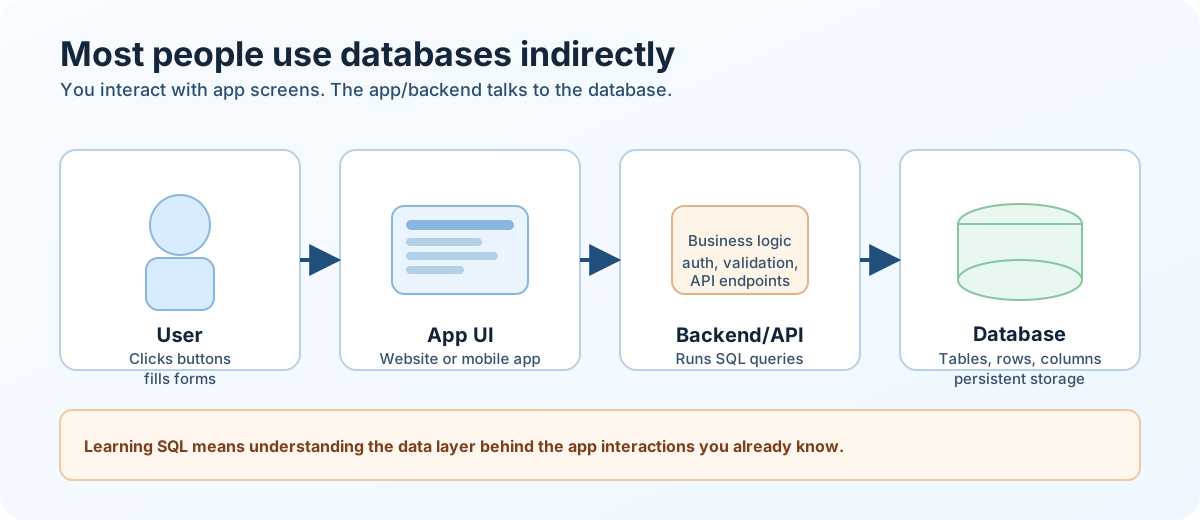
Most people use databases every day without opening a database tool directly.
You usually interact with a database through an app or website.
Example: ordering food in a delivery app
- You create an account (the app saves your profile information)
- You place an order (the app stores order details)
- The app updates delivery status (the saved order status changes)
- You open order history later (the app reads previously stored data)
Think in Tables, Rows, and Columns #
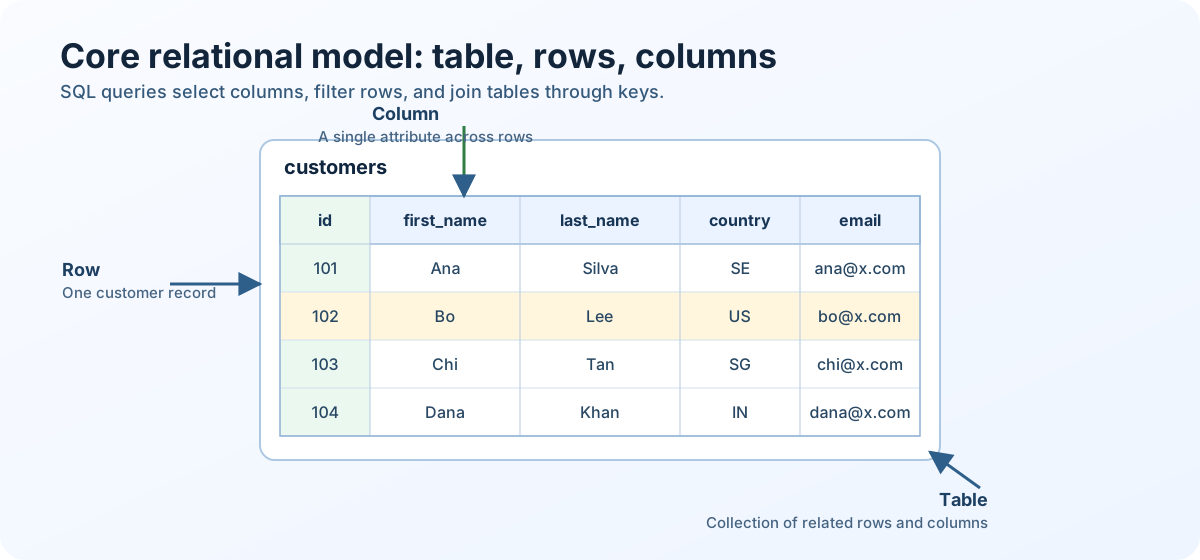
If you’ve ever used Excel or Google Sheets, you already understand the basics of a database.
Imagine a spreadsheet like this:
| id | first_name | last_name | |
|---|---|---|---|
| 1 | John | Smith | john@email.com |
| 2 | Sarah | Lee | sarah@email.com |
In database language:
- The whole spreadsheet = Table
- Each row = Row (sometimes called a record)
- Each column = Column (sometimes called a field)
- All related tables together = Database
What Makes Databases Different From Spreadsheets?
Databases are built to handle:
- Millions (or billions) of rows
- Multiple users at the same time
- Complex relationships between data
- High performance searching
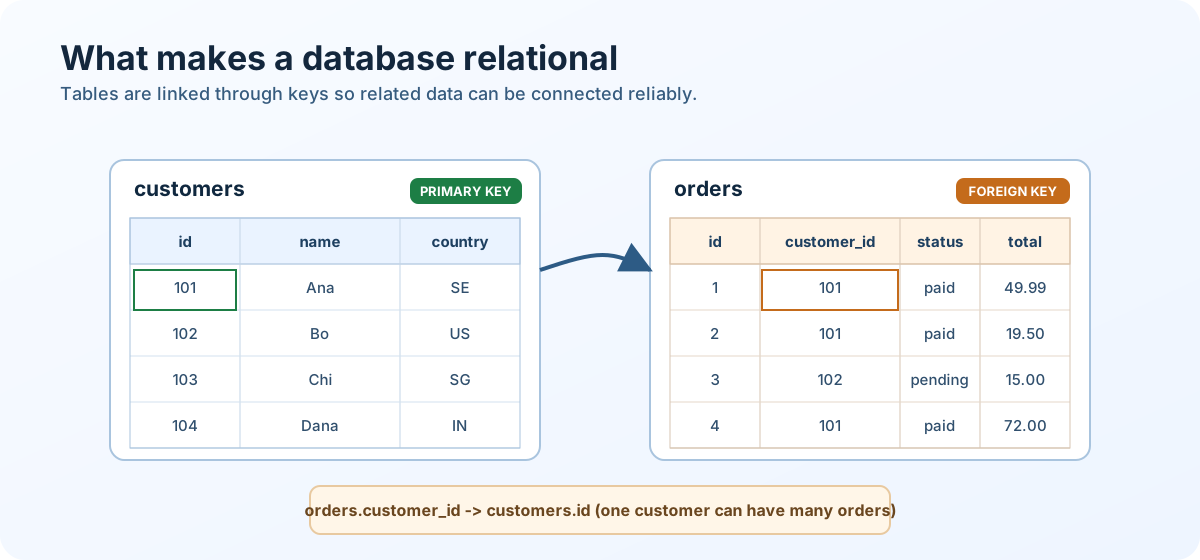
A simple relationship example: orders.customer_id links each order to customers.id.
Quick check:
- In the sample table above, what does one row represent?
- Which column looks like the identifier for each person?
- If you only wanted email addresses, which column would you read?
What 'Relational' Means #
A relational database organizes data into multiple related tables instead of one giant table.
Core idea:
- Each table represents one type of thing (for example, customers or orders).
- A primary key uniquely identifies each row (for example,
customers.id). - A foreign key connects one table to another (for example,
orders.customer_id). - These relationships let you combine data with JOIN queries without duplicating everything.
Tiny example:
customers(id, name)orders(id, customer_id, total)orders.customer_id -> customers.id
This means one customer can have many orders, and SQL can connect them when needed.
Where SQL Fits #
A database stores and organizes the data.
SQL is the language you use to work with that data.
For now, keep the distinction simple:
- Database = where the data lives
- SQL = how you ask questions about it or change it
The next lesson focuses on SQL itself and how queries are structured.
Different Database Workloads: OLTP and OLAP #
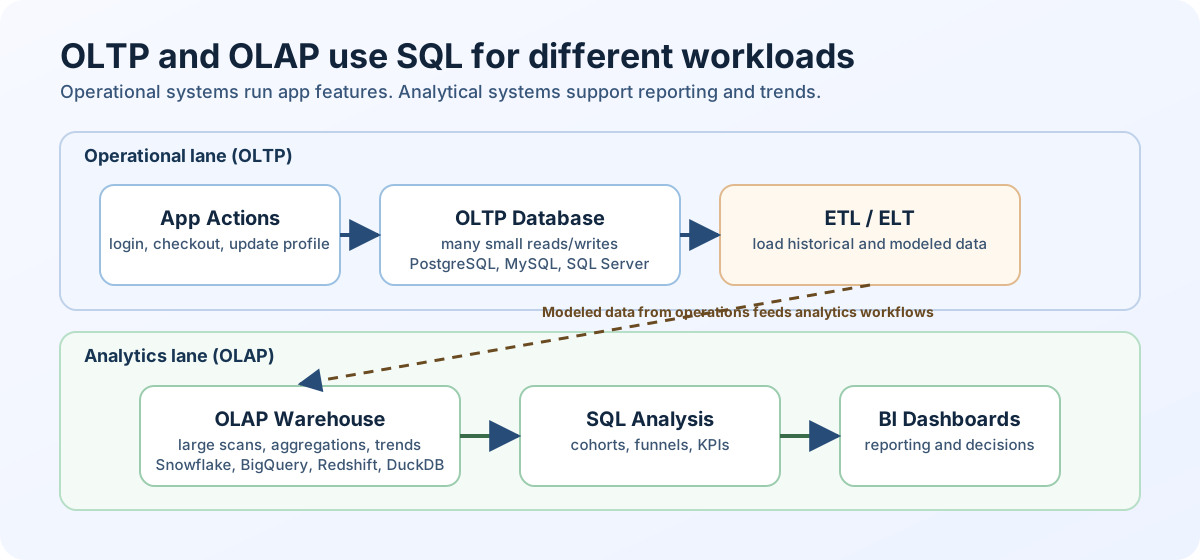
Not all databases are used for the same kind of work.
A company often uses more than one database workload at the same time.
For example, an ecommerce app might use one system to record each checkout as it happens, and another system to analyze sales trends across months of history.
OLTP (Online Transaction Processing) databases support the live application.
They handle many small read and write operations such as login, checkout, profile updates, and order status changes.
Common OLTP systems include PostgreSQL, MySQL, Microsoft SQL Server, Oracle, and SQLite.
OLAP (Online Analytical Processing) systems are built for analysis.
They work well for reporting over larger historical datasets, such as monthly revenue, customer retention, or product performance.
Common OLAP systems include Snowflake, Google BigQuery, Amazon Redshift, and Databricks SQL.
In many companies, data from OLTP systems is copied into an OLAP system through data pipelines that extract, transform, and load data (ETL) or extract, load, and transform it (ELT).
That makes it possible to combine data from multiple application systems and run heavier analytical queries without slowing down the live product.
| Workload | Main goal | Typical example |
|---|---|---|
| OLTP | Run the app | insert a new order, update delivery status |
| OLAP | Analyze what happened | calculate monthly revenue by region |
SQL is used in both, but this course focuses mostly on the analytical side.
That means you will usually write queries to explore data, summarize it, and find patterns rather than power a live app screen.
OLTP and OLAP describe workload patterns, and some systems can support parts of both.
Knowledge check #
3 questions
What is a primary key?
OLTP and OLAP databases are optimized for very different things. Which one is designed for "many small transactions, low latency"?
A foreign key in table A references:
Next Step #
Continue to What is SQL? to understand the language used to query and work with relational data.