UNION vs UNION ALL
Every join in this section combined tables side-by-side: each output row got wider as columns from both tables lined up on a key. Set operations do the opposite: they stack result sets on top of each other, so the output gets taller, not wider.
UNION ALL stacks two results and keeps every row. UNION stacks them and then removes duplicate rows from the combined result. That one-word difference changes row counts, performance, and, if you're not careful, correctness.
Syntax #
SELECT id, email FROM users
UNION ALL
SELECT user_id, NULL FROM orders;

-- Same shape with UNION: stack, then dedupe the combined result.
SELECT user_id FROM orders WHERE status = 'paid'
UNION
SELECT user_id FROM orders WHERE status = 'pending';
Both queries must produce the same number of columns, in the same order, with compatible types (an INTEGER can stack on a DECIMAL; a VARCHAR cannot stack on a DATE). Columns are matched by position, not by name, and the result's column names come from the first SELECT. Aliases in later branches are ignored.
UNION ALL vs UNION on the Same Input #
Stack the buyers behind paid orders on top of the buyers behind pending orders. There are 8 paid orders and 3 pending orders in the seed data, so UNION ALL returns all 11 rows, including user 1 twice (two paid orders) and users 5 and 8 in both branches:
-- UNION ALL: keep everything. 8 paid + 3 pending = 11 rows.
SELECT user_id FROM orders WHERE status = 'paid'
UNION ALL
SELECT user_id FROM orders WHERE status = 'pending';
Swap in UNION and the combined result is deduplicated down to 8 rows, one per distinct user_id. Note that it dedupes within a branch too (user 1's two paid orders collapse to one row), not just across branches:
-- UNION: stack, then dedupe. The same input returns 8 distinct rows.
SELECT user_id FROM orders WHERE status = 'paid'
UNION
SELECT user_id FROM orders WHERE status = 'pending';Default to UNION ALL unless you specifically need deduplication. This is the interview-classic point, and it cuts both ways:
- Cost.
UNIONmust compare every row against every other row (a sort or hash over the whole combined result) just to find duplicates. On large results that's real work, and it's wasted if the rows were already distinct. - Correctness.
UNIONremoves duplicates silently. If two different customers legitimately placed identical$29.99orders,UNIONcollapses them into one row and your totals are quietly wrong. No error, no warning.
The Tag-Column Pattern #
Once rows are stacked, you usually can't tell which branch each row came from. The fix is a literal tag column: a constant string in each SELECT:
SELECT 'paid' AS bucket, id, total
FROM orders
WHERE status = 'paid'
UNION ALL
SELECT 'pending', id, total
FROM orders
WHERE status = 'pending';
This pattern shows up constantly in real work: building activity feeds from several event tables, stacking this year's table on last year's archive, or reconciliation reports that put "what system A says" and "what system B says" in one result, tagged by source, so the differences are easy to scan.
ORDER BY Applies to the Whole Stack #
A single ORDER BY at the very end sorts the entire combined result. It does not belong to the last SELECT, and you can't sort each branch independently by putting ORDER BY between the branches (that's a syntax error). Stack first, sort once.
INTERSECT and EXCEPT #
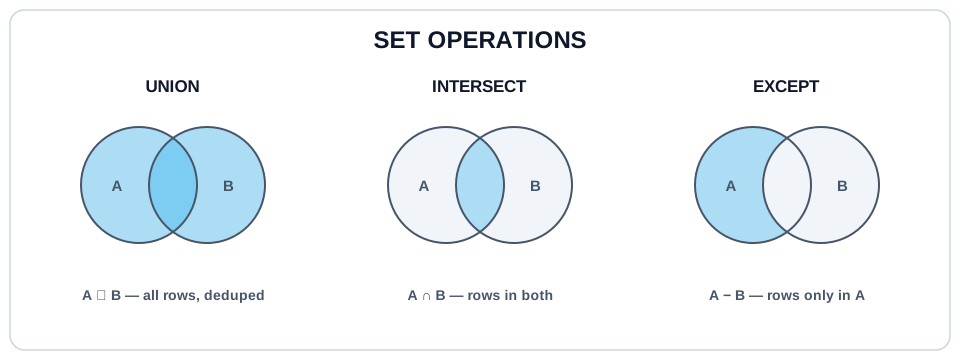
UNION has two siblings that follow the same column-compatibility rules: INTERSECT returns only rows that appear in both results, and EXCEPT returns rows in the first result that are not in the second. They're handy for comparing two queries ("which users bought in both January and February?"), but UNION ALL is by far the one you'll use most, so file the other two away for now.
Try It #
Build a single activity feed by stacking signups and orders, tagged by event type. With 10 users and 13 orders, UNION ALL returns 23 rows.
Practice #
Return one row per paid or pending order with three columns: bucket (the literal 'paid' or 'pending', matching the order's status), order_id, and total. Build it by stacking two tagged SELECTs with UNION ALL. No ordering requirement.
Mistakes to Watch For #
- Writing
UNIONout of habit and silently losing legitimate duplicate rows: two identical orders collapse to one, and your totals are wrong with no error. - Paying the dedupe cost for nothing: if the branches can't produce duplicates (or duplicates are fine),
UNIONdoes an expensive sort/hash for zero benefit. - Expecting columns to match by name. They match by position, so
SELECT id, totalstacked onSELECT total, idruns happily and produces garbage. - Putting
ORDER BYorLIMITon an individual branch and expecting per-branch behavior. The finalORDER BYapplies to the whole stacked result. - Reaching for
UNION ALLwhen you actually needed aJOIN(or vice versa). Joins add columns from a related table; set operations add rows from a same-shaped query.
Knowledge check #
4 questions
You stack two months of order rows with
UNIONand the revenue total comes out lower than the two months added separately. Most likely cause:The first SELECT returns 3 columns; the second returns 2. What happens?
In
SELECT id AS user_id FROM users UNION ALL SELECT user_id AS buyer FROM orders, the output column is named:An
ORDER BYwritten at the end of aUNION ALLquery sorts:
Next Step #
That wraps up the Joins section. You can now combine tables side-by-side with joins and stack results with set operations. Continue to Subqueries with IN / EXISTS, queries nested inside queries.