Star Schema Basics
Use this page as an implementation reference for building a datamart with fact and dimension tables.
Goal:
- define the correct grain
- model dimensions and facts cleanly
- load data in a safe order
- validate metric correctness before dashboard use
When to Use a Star Schema #
Choose star schema when:
- analysts need fast, readable SQL
- KPIs are mostly aggregate reporting metrics
- you want reusable dimensions across many facts
- BI tools are primary consumers
Core Components #
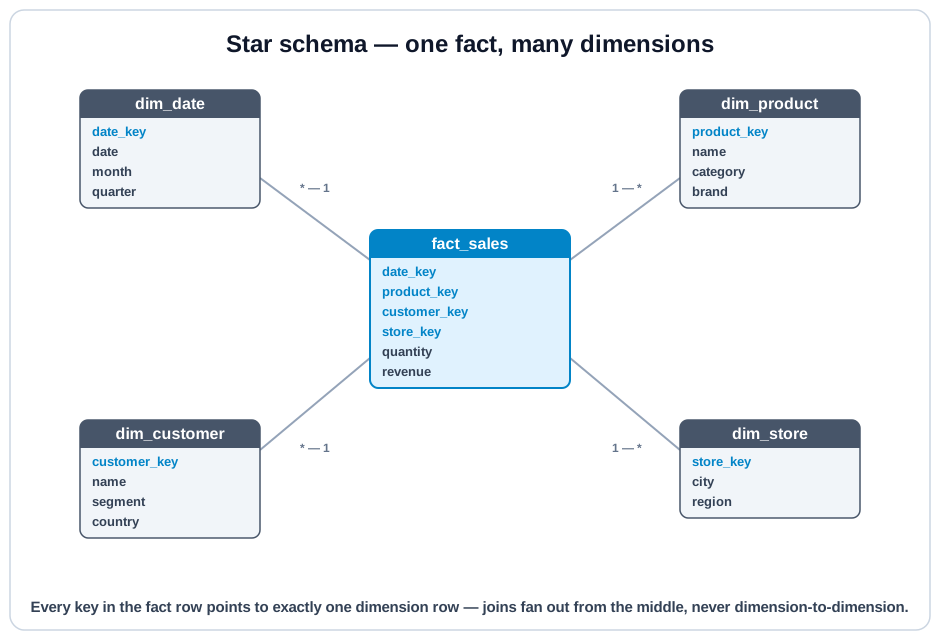
- Fact table: measurable events or snapshots
- Dimension tables: descriptive context (customer, product, date, channel)
- Surrogate keys: stable integer keys for joins
- Conformed dimensions: shared dimensions used by multiple facts
Fact Table Types #
- Transaction fact: one row per event (order line, claim)
- Periodic snapshot fact: one row per entity per time period
- Accumulating snapshot fact: one row tracking multi-step lifecycle
Build Workflow (Recommended) #
- Choose one business process (for example: orders).
- Declare exact fact grain in one sentence.
- List dimensions needed for slicing/filtering.
- Define additive and non-additive metrics.
- Choose SCD policy per dimension.
- Build dimension tables first, then fact.
- Add data tests and reconciliation checks.
- Expose as mart/semantic layer for BI.
Step 1: Declare Grain Explicitly #
Example grain statement:
One row in fact_order_item represents one product line on one completed order.
If this sentence is ambiguous, stop and fix it before modeling.
Step 2: Dimension Design #
For each dimension, define:
- business key (natural key)
- surrogate key
- attributes used by analysis
- SCD behavior (Type 1 or Type 2)
- null/default handling rules
Step 3: Fact Design #
For fact table columns:
- foreign keys to dimensions
- event timestamp/date key
- numeric metrics
- optional degenerate dimensions (order_number, invoice_id)
Classify metrics:
- additive (safe to sum across all dims)
- semi-additive (safe across some dims, not all)
- non-additive (ratios/percentages; compute from base measures)
SCD Considerations #
Dimension history strategy affects metric interpretation:
- Type 1: overwrite (no history)
- Type 2: row versioning (history preserved)
- Type 3: limited historical columns
Pick SCD policy per business question, not per engineering convenience.
Starter SQL Templates #
-- Dimension templates
CREATE TABLE dim_customer (
  customer_key INTEGER PRIMARY KEY,
  customer_id VARCHAR,              -- business key
  customer_name VARCHAR,
  segment VARCHAR,
  country VARCHAR,
  effective_start_ts TIMESTAMP,     -- for SCD2
  effective_end_ts TIMESTAMP,       -- for SCD2
  is_current BOOLEAN
);

CREATE TABLE dim_product (
  product_key INTEGER PRIMARY KEY,
  product_id VARCHAR,
  product_name VARCHAR,
  category VARCHAR,
  brand VARCHAR
);

CREATE TABLE dim_date (
  date_key INTEGER PRIMARY KEY,     -- yyyymmdd
  calendar_date DATE,
  year INTEGER,
  quarter INTEGER,
  month INTEGER,
  week INTEGER,
  day_of_month INTEGER
);-- Fact template
-- Grain: one row = one product line on one order -> (order_id, order_item_id)
CREATE TABLE fact_order_item (
order_item_key INTEGER PRIMARY KEY,
order_id VARCHAR, -- degenerate dimension
order_item_id VARCHAR, -- degenerate line key (completes the grain)
order_date_key INTEGER, -- FK -> dim_date
customer_key INTEGER, -- FK -> dim_customer
product_key INTEGER, -- FK -> dim_product
quantity INTEGER,
gross_amount DECIMAL(18,2),
discount_amount DECIMAL(18,2),
net_amount DECIMAL(18,2),
cost_amount DECIMAL(18,2)
);-- Query pattern
SELECT
DATE_TRUNC('month', d.calendar_date) AS calendar_month,
c.segment,
SUM(f.net_amount) AS revenue,
SUM(f.net_amount - f.cost_amount) AS gross_margin
FROM fact_order_item AS f
JOIN dim_date AS d ON d.date_key = f.order_date_key
JOIN dim_customer AS c ON c.customer_key = f.customer_key
GROUP BY DATE_TRUNC('month', d.calendar_date), c.segment;Load Order and Data Contracts #
Recommended load sequence:
- stage source tables
- load/update dimensions
- resolve surrogate keys
- load fact rows
- run quality + reconciliation tests
Contract examples:
- no duplicate fact grain keys
- no orphan fact foreign keys
- metric totals reconcile to trusted source aggregates
Validation SQL You Should Always Run #
-- 1) Grain uniqueness on the true grain key
-- (order_id, product_key) is NOT the grain: an order can legitimately
-- repeat the same product on separate lines
SELECT order_id, order_item_id, COUNT(*) AS row_count
FROM fact_order_item
GROUP BY order_id, order_item_id
HAVING COUNT(*) > 1;

-- 2) Orphan keys
SELECT COUNT(*) AS missing_customer_keys
FROM fact_order_item f
LEFT JOIN dim_customer c ON c.customer_key = f.customer_key
WHERE c.customer_key IS NULL;

-- 3) Reconciliation
SELECT
  ROUND(SUM(net_amount), 2) AS fact_total
FROM fact_order_item;
Performance and Maintenance Notes #
- Keep fact tables narrow; move verbose text to dimensions.
- Partition/cluster fact tables by common time filters where supported.
- Pre-aggregate common dashboard grains into summary marts.
- Use conformed dimensions to avoid duplicated business logic.
- Version metric definitions when formulas change.
Common Modeling Mistakes #
- Mixed grain in one fact table.
- Ratios stored as base fact metrics (instead of deriving from numerators/denominators).
- SCD policy chosen without business sign-off.
- Facts loaded before dimensions are stable.
- Hidden duplicate joins caused by non-unique dimension business keys.
Interactive SQL Check #
Run this query to practice a classic star-style aggregate across orders, items, and product dimensions.
Related Lessons #
A datamart is production-ready when:
1) grain is explicit and tested,
2) metrics reconcile,
3) dimensions are trustworthy,
4) analysts can query without custom join logic.